Voice-first paperwork · for the trades

Less paperwork.
More time
on the tools.

Speak your job notes. Bergg's AI turns them into customer summaries, invoices, compliance notes, warranty statements and follow-ups — so you can spend more time on the work itself. Review, edit and share from your iPhone.

DOWNLOAD ON THE App Store
GOOGLE PLAY Coming soon
See a real Bergg document FREE: 3 DOCUMENTS + 3 MINUTES OF VOICE / MONTH
9:41
Bergg
ONE NOTE · DOCUMENT DRAFTS Recording — tap to stop
0:38
RECENT NOTES 3
Boiler service + flue gas test — D. Hartley TODAY 09:14 · 4 OUTPUTS
Quoted full rewire, ground floor — J. Okafor YESTERDAY · 3 OUTPUTS
JOBS VOICE SETTINGS
INVOICE LINE

Kitchen tap replacement — £180.00

EXAMPLE DRAFT · REVIEW FIRST
COMPLIANCE NOTE

Water isolated before work. Connections checked for leaks, as reported in the note.

FROM YOUR JOB NOTE
CUSTOMER SUMMARY

Replaced the kitchen tap and checked the connections for leaks.

PLAIN ENGLISH
From job note to PDF

Let AI draft it.
Make it yours.
Get back to the job.

Construction, plumbing, heating and electrical work take skill and attention. Writing up the same job afterwards should not take over your evening.

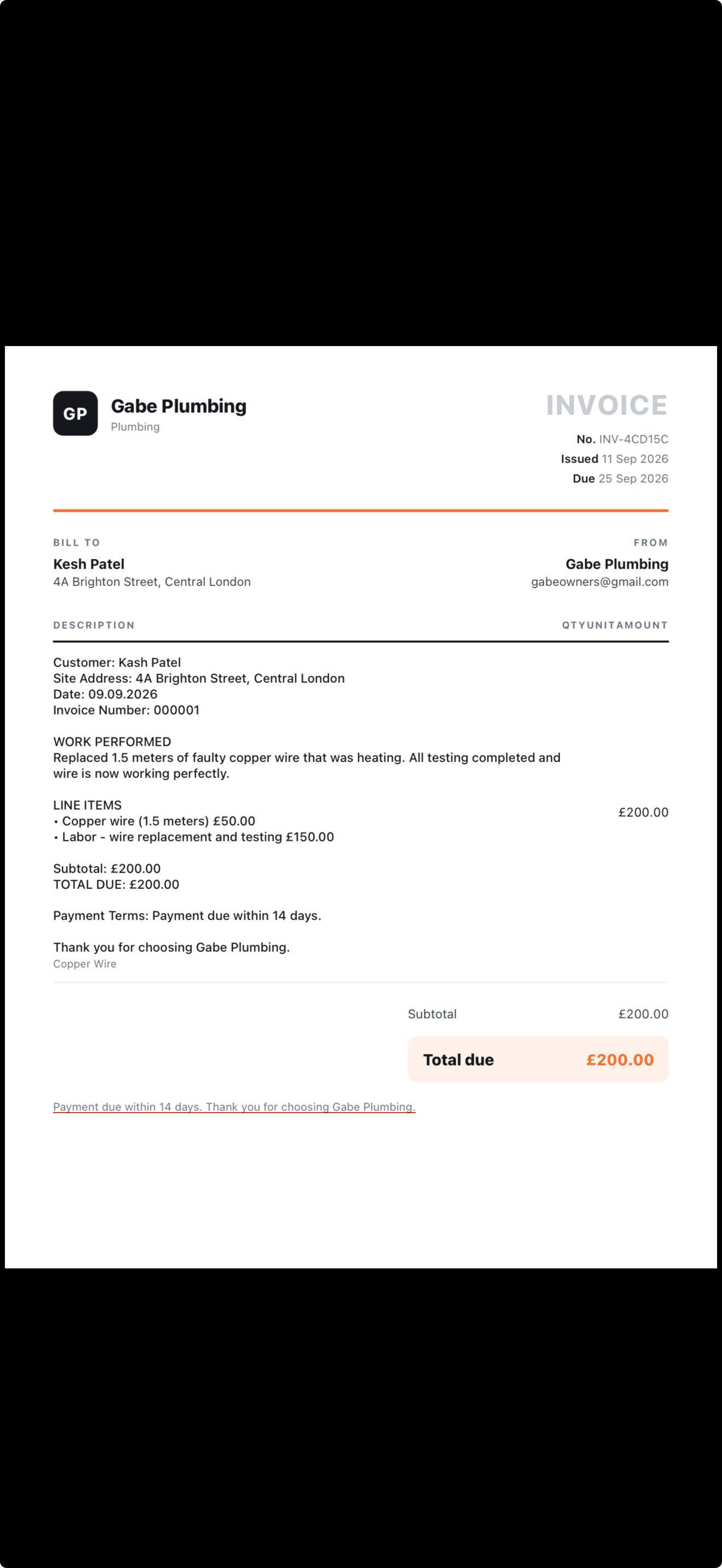
This is an actual PDF generated with Bergg. An invoice is one example: your voice notes can also become customer summaries, compliance notes, warranty statements and follow-ups.

You review the details and edit the draft. Bergg handles the writing and formatting, helping you spend more of your time on the work that needs you.

See how a voice note becomes documents
An invoice PDF generated with Bergg, showing a business header, work description and total.
Actual Bergg output · Demo customer data · Invoice example. Select the image to open the full screenshot.

BUILT FOR EVERY TRADE

ELECTRICAL  ·  HVAC  ·  PLUMBING & HEATING  ·  ROOFING  ·  GROUNDWORKS  ·  GENERAL BUILDING  ·  MAINTENANCE  ·  LANDSCAPING  ·  PAINTING  ·  FACILITIES  ·  CIVIL  ·  
The second shift

You didn't get into the trades to type.

The job is finished, but the write-up is still waiting. Bergg helps turn the details you remember into documents you can check and send.

Record
CAPTURE THE DETAILS

Describe the job while it is fresh in your mind.

Check
REVIEW YOUR DRAFTS

Check the names, amounts and work before sharing.

Share
GET THE WRITE-UP OUT

Preview a PDF and choose how to send it.

22:47

Thursday. Still at the kitchen table.

The job finished at four. The paperwork didn't. Every one of these should have been done — and sent — before the van left site.

Invoice — 14 Oak Lane NOT SENT
Job notes — Crown Inn refit DUE FRI
Warranty draft — EV charger DRAFT
The fix

Record. Check. Share.

Describe the job in your own words. Review the details Bergg extracts, choose the documents you need and prepare your PDFs.

01

Talk

Thirty seconds, in your own words, on the walk back to the van.

02

AI structures it

Bergg pulls out the job, materials, hours, compliance points and follow-ups.

03

Documents appear

Choose from invoices, customer summaries, compliance notes, warranties and follow-ups.

04

Send

Review, tap, sent. Filed against the job automatically.

Example walkthrough

Watch a voice note become paperwork.

Tap the mic to play an example: one plumber's job note becomes several document drafts. This demonstration uses a prepared example; use the iPhone app for your own notes.

YOU SAY IT

Play the example job note.

Job, materials, hours, follow-ups — any order, your words.
TRANSCRIPT

The example note appears here.

BERGG WRITES IT
CUSTOMER SUMMARY
INVOICE LINE
COMPLIANCE NOTE
FOLLOW-UP
Built for site

Your job notes, ready to work from.

THE CORE

Speak your job notes

Describe the work while it is fresh in your mind. Move away from loud tools where possible, then check the transcript and the details.

Understands the trade

Knows a consumer unit from a condenser. Materials, hours and follow-ups land in the right fields.

Your details on every PDF

Business name, contact, VAT number, bank line, payment terms — documents that look like you hired an office.

Pick your look

Start with the Modern document style. Pro and Max include Classic, Minimal, Bold and Elegant too.

You check the details

AI can make mistakes. Check names, prices, dates and claims; add missing details before sharing with your customer.

Prepare and share PDFs

Export and send by email, text or WhatsApp before you leave site.

Filed by job

Keep your saved notes and documents organised by job, so you can return to the work later.

Built for UK · US · EU

Pick your region once — currency, VAT or sales tax, date formats and bank details all follow suit.

5 document types · editable drafts

Different documents. One job note.

Choose the documents your job needs. Review every draft before sharing. Compliance notes do not replace required inspections, testing or official certification.

INVOICE
CUSTOMER SUMMARY
COMPLIANCE NOTE
WARRANTY
FOLLOW-UP
CHOOSE WHAT THE JOB NEEDS
The workflow

Keep the write-up close to the work.

THE OLD WAY
Typing at the kitchen table at 22:00
Retyping the same job details
Details forgotten by invoicing day
Invoices out days late — paid later
Every document formatted differently
WITH BERGG
Talking for 30 seconds on site
One voice note — five document types
Captured while the van's still warm
Invoice sent before you pull away
Formatted drafts that you review

LESS REPEATING YOURSELF. MORE TIME FOR THE WORK.

Who it's for

Built for the tools, not the desk.

Electricians HVAC Plumbers
Roofers
Builders
Maintenance
Landscapers
Painters
Civil & groundworks
Facilities
How it works

From your first note to a checked PDF.

01

Create your account. Open Record.

Install on iPhone and create an account. Add your business details in Account, then allow microphone access when you record.

02

Say what you did.

Job, materials, hours, follow-ups — any order, your words, thirty seconds.

03

AI structures the note.

Bergg sorts what you said into the right documents and the right fields.

04

Review and edit.

Everything's editable. Include what you want, drop what you don't. You sign off.

05

Prepare and share.

Preview the PDFs, then choose where to share them. Documents are saved to your job.

Pricing

Try it on your next job.

Start with 3 documents and 3 minutes of voice per month. Each document counts separately, even if you share several as one PDF. Prices below are the UK App Store tiers; the App Store shows your own currency at checkout.

FREE
Free

For trying it on your next job.

  • 3 documents a month
  • 3 minutes of voice notes
  • All 5 document types
  • PDF export & sharing
Start free
MORE DOCUMENTS PRO
£19.99 /month

For the one-person outfit.

  • 50 documents a month
  • 2 hours of voice a month
  • Five document styles
  • Sharper AI drafting
  • No watermark
Get Pro
MAX
£99.99 /month

For the busiest books.

  • Unlimited documents & voice
  • All five document styles
  • Two-pass polished AI drafting
  • Everything in Pro
  • PDF export & sharing
Get Max

CANCEL ANYTIME · NO CARD FOR THE FREE PLAN

FAQ

Fair questions.

Does it actually work on a noisy site?+−

Background noise can affect transcription. Record away from loud tools where possible and check the result. We are still gathering real-site feedback; we do not promise accuracy in every setting.

Do I have to speak in a special format?+−

No. Talk like you'd talk to your apprentice: what you did, what you used, how long it took. The AI does the structuring — any order, any phrasing.

What documents can it generate?+−

Invoices, customer summaries, compliance notes, warranty statements and follow-ups. Choose the documents you need and check each draft. A compliance note is not an official certificate.

Can I edit documents before they go out?+−

Review the job details and document drafts before you share them. You decide what to send to your customer. Audio and job information are processed online to create the drafts.

Will it make things up?+−

AI can make mistakes or add incorrect details. Check names, prices, dates and statements before sending. Fill in missing information and remove anything you cannot confirm.

Do I need signal on site?+−

You need an internet connection to transcribe a note and draft documents. Processing time depends on the connection and the note. If processing fails, check the recording screen for recovery options.

Can I put my company details on documents?+−

Yes — business name, contact details, VAT or tax ID, bank details and payment terms go on every PDF. Set them once in Settings and every document carries them.

Who owns my data? Is it secure?+−

You do. Notes and documents are encrypted in transit, and you can export or delete everything at any time. Your data is never sold.

What phones does it work on?+−

iPhone today — Android is on the way. Your documents export as standard PDFs, so anyone can open them anywhere.

Still stuck, or found a bug?

The support page has how-tos and a direct line to us — we answer fast.

Visit support
Bergg bear mark

Stop doing paperwork.
Start building.

Try one job you already know well. Record the details, check the draft and prepare your first PDF. Free includes 3 documents and 3 minutes of voice per month.

DOWNLOAD ON THE App Store
GOOGLE PLAY Coming soon
IOS TODAY · ANDROID SOON · FREE PLAN · NO CARD REQUIRED